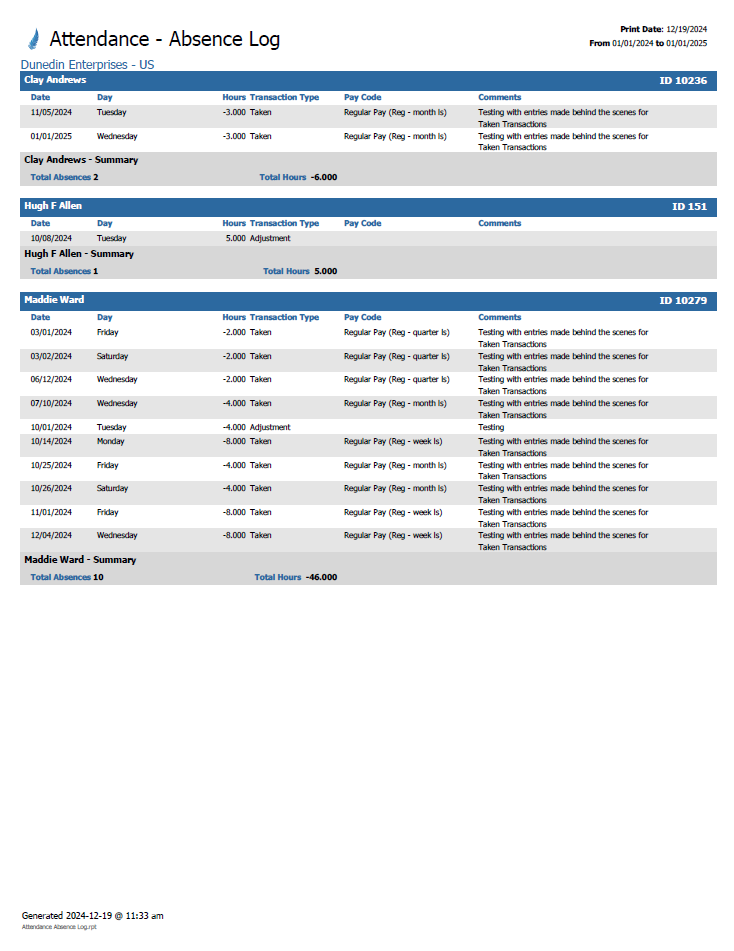
Absence Log
The Absence Log report provides a list of absences. Details include the Employee Name, Date(s), Day, Hours, Transaction Type, Pay Code, Comments, and Company.
Note: The Absence Log Report is controlled by ‘Attendance – Task – Attendance Absence Log Report’ Securable.
Available Parameters
-
General Tab:
From Date, To Date, and Output Type. -
Employees Tab:
My Employees, Specific Employees, or Selected Company/Organization Levels. -
Attendance Plans Tab:
Select the Attendance Plan(s); if no plans are selected the report will default to all plans. -
Pay Codes Tab:
All Pay Codes, or Specific Pay Code.
Note: When Specific Pay Code is selected, you can choose more than one Pay Code. If no Pay Codes are selected, the report will default to all Pay Codes.